Go deep on the paper. We handle the surface.
Write in LaTeX or Typst, see the real PDF as you work, and let an AI Copilot make whole-document edits you can review line by line. Citations come from 327 million OpenAlex works.
Free while in beta · Sign in with an email code only when you compile, use the AI or save
The dive
From a blank page to a finished PDF,
one depth at a time.
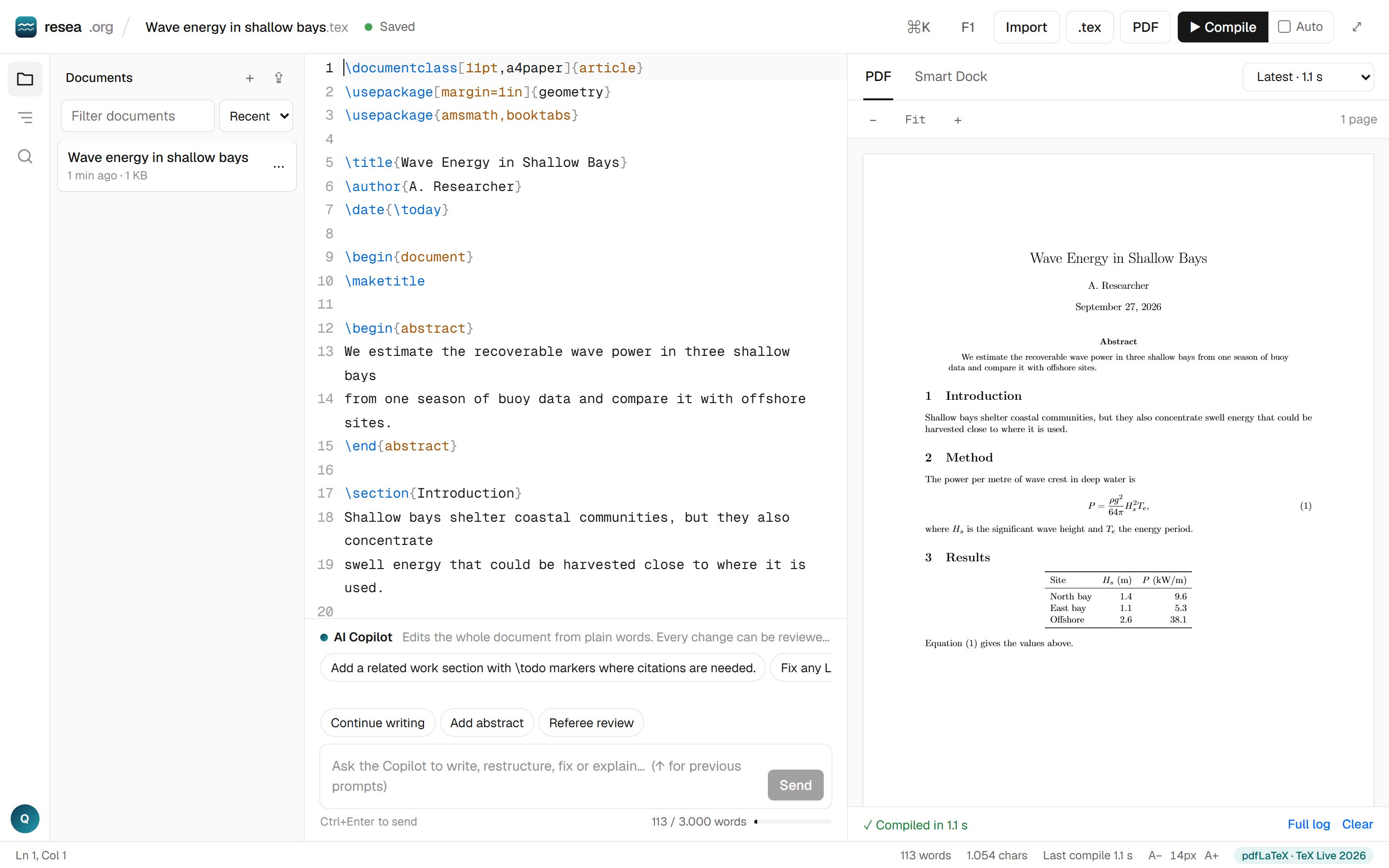
Everything below is what the editor does today. The screenshot is the real product; the snippets show the exact syntax it writes.
Start typing. No sign-up wall.
The editor opens straight onto a complete, compilable document. Your draft stays in your browser until you choose to keep it; the email code comes only when you compile, ask the Copilot or save.
Cite what you actually read.
Search 327M OpenAlex works from the sidebar and press Cite: the key lands at your cursor and the bibliography is written when you compile. Keys only come from papers you added, so nothing is invented.
The real compiler, in your tab.
pdfLaTeX from TeX Live 2026 and the Typst compiler both run as WebAssembly on your machine. Errors are listed with their line; click one and the cursor is there. After the first load a LaTeX compile takes about two seconds, Typst well under one.
A Copilot that shows its work.
Ask in plain words: “add a limitations section”, “fix the formula in Section 3”, “make it IEEE style”. The Copilot edits the whole document, tells you what it changed, and shows the diff. Keep it or undo it in one click.
Two languages, one editor
LaTeX for the journal.
Typst when you want speed.
Pick either when you create a document. Templates, the Copilot, citations, error lines and export work the same way for both.
What it stands on
Open infrastructure, stated with sources.
Pricing
Free while in beta.
Writing, compiling and citing are free. The Copilot has a daily limit per account so the service stays up for everyone.
- Up to 50 documents, LaTeX and Typst
- Unlimited compiles, in your browser
- OpenAlex search and citations
- 30 Copilot edits a day
- Everything in Free
- A much higher daily Copilot limit
- Priority model access
FAQ
Questions, answered straight.
Do I need an account to use resea.org?
No account is needed to start writing. You sign in with your email address only when you compile a PDF, use the AI assistant or save a draft to your account. We send a 6-digit code; there is no password and no payment step, and you can delete your account and drafts at any time.
What does the editor actually do?
You edit the complete source of your paper in LaTeX or Typst and see the real PDF next to it. An AI Copilot edits the whole document from a plain-words instruction and shows every change as a diff you can undo. You can search OpenAlex, cite a paper at your cursor and get the bibliography built for you.
Is the PDF really compiled with LaTeX?
Yes. LaTeX documents are compiled by an actual pdfLaTeX engine (TeX Live 2026) running as WebAssembly in your browser, and Typst documents by the real Typst compiler, also in your browser. Nothing is approximated and there is no server queue. Each engine downloads once and is cached after that.
Can I use Typst instead of LaTeX?
Yes. Pick a Typst template when you create a document. Typst has a simpler syntax and compiles in well under a second after the first load. Citations, the Copilot, error lines, outline and export all work the same way as for LaTeX.
Is this an Overleaf alternative?
It covers the full loop: writing and revising with AI, citing from OpenAlex, and compiling a real PDF, with no account needed to start. You can download the .tex or .typ source at any time and compile it anywhere else.
Will it invent citations?
The assistant is instructed never to invent citation keys, DOIs or numeric results. Citation keys come only from papers you added from OpenAlex, and unsupported claims are flagged with a citation-needed marker for you to resolve.
What does resea.org cost?
The beta is free, with a daily AI request limit per account so the service stays available. A Pro plan is planned after launch, around $9 per month for heavier AI use.
Where are my drafts stored?
Before you sign in, your draft is kept in your browser. After you sign in it is saved to your account, so it is there when you sign in from another device. Deleting your account removes your email and every draft immediately.
Take the paper under the surface.
Open the editor and start writing. Sign in only when you want to compile, use the Copilot or keep your drafts.